Link History board (kanban)
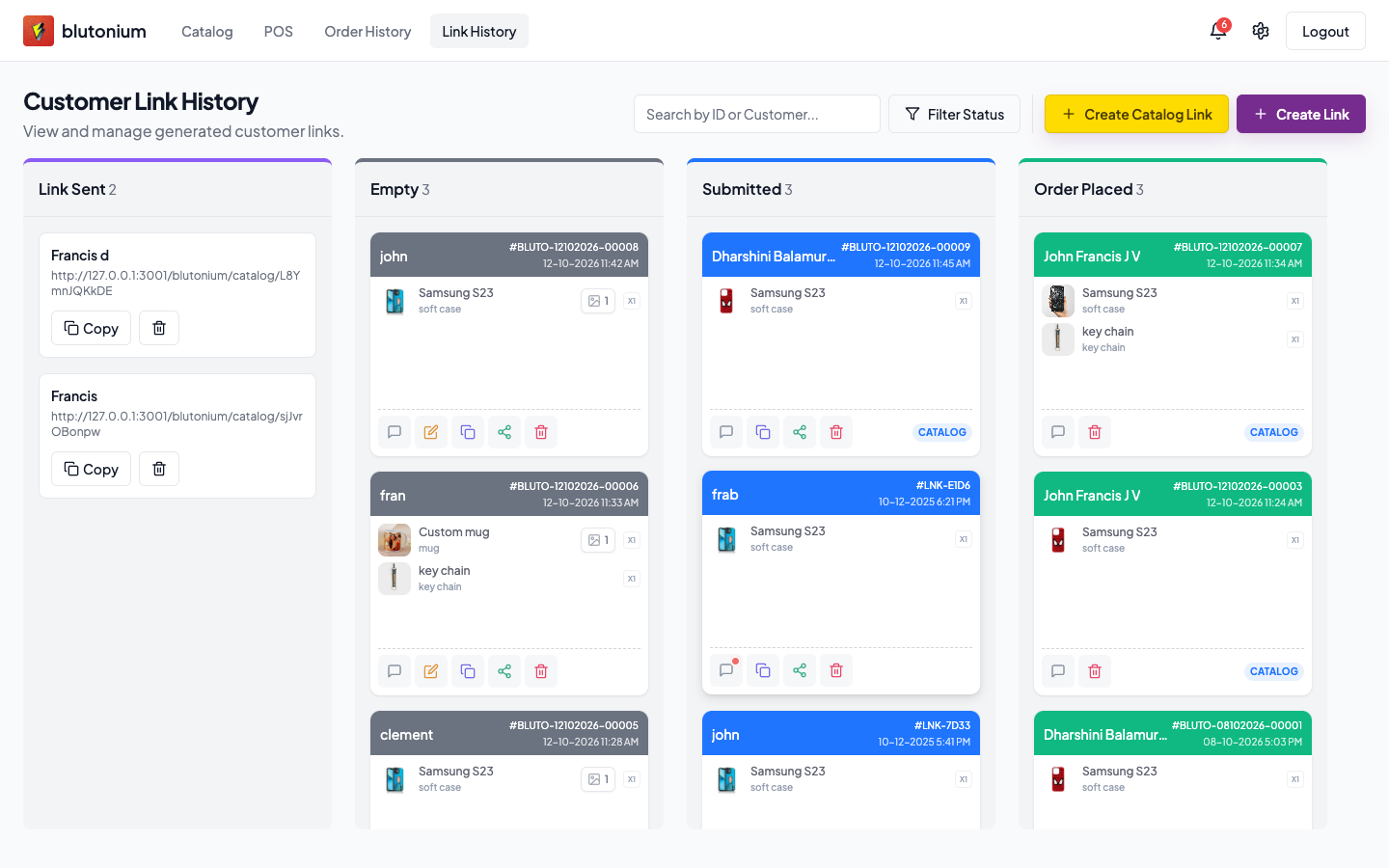
POS Link History is the staff board for customer links and unconsumed catalog links. Route: /{pos-slug}/link-history.
Staff
Columns
| Column | What it holds |
|---|---|
| Link Sent | Catalog links that have not been consumed yet (copy URL / delete) |
| Empty | Customer links waiting for the customer to finish checkout |
| Submitted | Customer finished checkout (or a catalog checkout created a submitted link) |
| Order Placed | Staff created a POS order linked to that customer link |
Statuses on a customer link are exactly: Empty, Submitted, Order Placed, and Archived. Archived links are hidden from this board.
Use Filter Status → Show Columns to show or hide the four columns. Empty column copy: No links here.
Typical flow (Empty → Submitted → Order Placed)
- Staff create a customer link → card in Empty.
- Customer completes Checkout step 3 → board moves the card to Submitted (live update via SSE; toast like
Customer link {link_id} has been submitted!). - Staff open the card → Customer Submission → Add to Orders, then finish the POS sale → card moves to Order Placed.
Catalog path: card starts in Link Sent; after the customer places a catalog order, a Submitted customer link appears (source tagged Catalog on the card). Convert the same way.
Card actions
| Action | When |
|---|---|
| Open card | Any board card — opens Customer Submission (response details) |
| Chat (Comments) | Always — staff/customer messages; unread badge for new Customer messages |
| Edit | Empty only |
| Copy / Share | Empty or Submitted |
| Delete | Confirm dialog (Delete Customer Link) |
Cards show # + link_id, date, products, and optional Service Charge / Catalog tags.
Live updates
While Link History is open, POS listens for global customer-link SSE (status_change, link_submitted, new_comment) and refreshes the board. Opening Comments also streams that link’s chat.
Customer
Customers do not use this board. After you submit a shared checkout link, staff see your response under Submitted. You track progress on the Checkout success screen — Chat and design approval.